> ## Documentation Index
> Fetch the complete documentation index at: https://docs.wirespeed.co/llms.txt
> Use this file to discover all available pages before exploring further.
# Introduction to Chat Ops
> What is it and how to get started
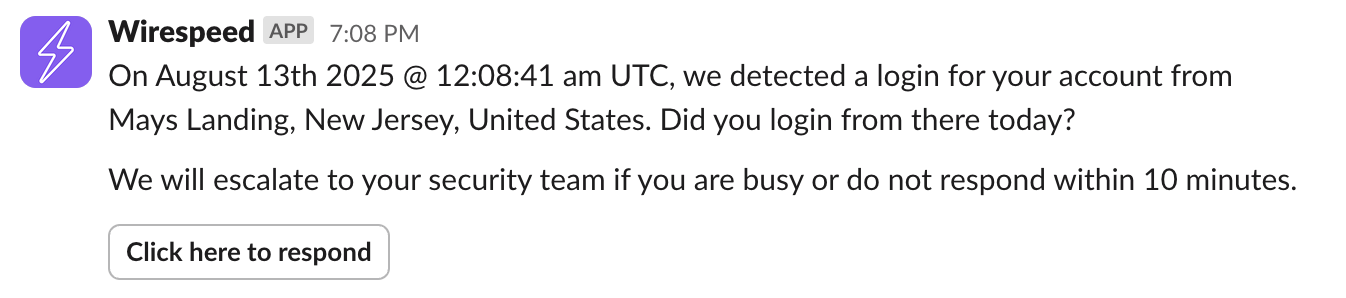
Chat operations (ChatOps) are how Wirespeed investigates cases involving users from your company. We interact with them over your collaboration platforms to investigate and question them about suspicious activities.
 ## Escalations
By default, all chat ops have a delay time of 10 minutes. If the user has not responded in that window and **Manager Chat Ops** is enabled, Wirespeed escalates to their manager. If no response is received after escalation, Wirespeed continues using the rule's configured timeout outcome. You can modify the escalation delay under **Settings > Chat Ops**.
## Security Team Notifications
Security team alerts are delivered through standard notifications and team inbox email escalations instead of a chat ops conversation. Configure:
* user notification subscriptions in your profile ([Notifications](/settings/notifications))
* team escalation inboxes under **Settings > Team**
## Multi-factor Verification
After a chat ops message is sent you can optionally require the user to verify their identity over SMS. This helps protect your organization in cases where the user's account has already been compromised. When this setting is enabled, the user will be texted an SMS code to verify their identity after they respond to our chat ops message. If no mobile phone number is identified for the user or this setting is disabled, we will message their manager and require verification from them instead.
***
## FAQ
If a user doesn't respond within the escalation delay (default: 10 minutes), Wirespeed escalates to their manager. If the manager also doesn't respond within the escalation delay, the detection proceeds with a suspicious verdict (or your configured timeout verdict).
Yes. Navigate to **Settings > Chat Ops** to modify the escalation delay time. Timeout outcomes are configured in the relevant verdict rule under **Settings > Verdicts**.
Wirespeed can send chat ops messages via Email, Slack, Microsoft Teams, and SMS. We initially message users through all available communication channels to maximize response rates.
If SMS MFA verification is enabled, users must verify their identity with a code sent to their phone after responding to a chat ops message. This helps ensure a compromised account cannot falsely claim activity is legitimate. If no phone number is available, verification is escalated to the user's manager instead.
## Escalations
By default, all chat ops have a delay time of 10 minutes. If the user has not responded in that window and **Manager Chat Ops** is enabled, Wirespeed escalates to their manager. If no response is received after escalation, Wirespeed continues using the rule's configured timeout outcome. You can modify the escalation delay under **Settings > Chat Ops**.
## Security Team Notifications
Security team alerts are delivered through standard notifications and team inbox email escalations instead of a chat ops conversation. Configure:
* user notification subscriptions in your profile ([Notifications](/settings/notifications))
* team escalation inboxes under **Settings > Team**
## Multi-factor Verification
After a chat ops message is sent you can optionally require the user to verify their identity over SMS. This helps protect your organization in cases where the user's account has already been compromised. When this setting is enabled, the user will be texted an SMS code to verify their identity after they respond to our chat ops message. If no mobile phone number is identified for the user or this setting is disabled, we will message their manager and require verification from them instead.
***
## FAQ
If a user doesn't respond within the escalation delay (default: 10 minutes), Wirespeed escalates to their manager. If the manager also doesn't respond within the escalation delay, the detection proceeds with a suspicious verdict (or your configured timeout verdict).
Yes. Navigate to **Settings > Chat Ops** to modify the escalation delay time. Timeout outcomes are configured in the relevant verdict rule under **Settings > Verdicts**.
Wirespeed can send chat ops messages via Email, Slack, Microsoft Teams, and SMS. We initially message users through all available communication channels to maximize response rates.
If SMS MFA verification is enabled, users must verify their identity with a code sent to their phone after responding to a chat ops message. This helps ensure a compromised account cannot falsely claim activity is legitimate. If no phone number is available, verification is escalated to the user's manager instead.